GTMC
  • Preface
    • 00Introduction
    • 01Update Concepts and Update Types
    • 02Continuous Block Updates and Analysis Methods
    • 01Tick and Inter-Tick Timing
    • 02A First Look at Intra-Tick Timing
    • 03Scheduled Ticks and Scheduled Tick Components
    • 05Block Entities
    • 06Block Events
    • 01Masa Gadget
    • 02Litematica Tutorial
  • 附录
  • A.Stacks
  • B.Glossary

Table of contents

  • Preface
    • 00Introduction
    • 01Update Concepts and Update Types
    • 02Continuous Block Updates and Analysis Methods
    • 01Tick and Inter-Tick Timing
    • 02A First Look at Intra-Tick Timing
    • 03Scheduled Ticks and Scheduled Tick Components
    • 05Block Entities
    • 06Block Events
    • 01Masa Gadget
    • 02Litematica Tutorial
  • 附录
  • A.Stacks
  • B.Glossary
Loading article content
Loading
Loading article
GTMC

Graduate Texts in Minecraft

"Curiosity in 'cubic' inch."

Preface

Articles
25
Authors
12
Revised
August 2026

Community

  • About
  • Authors
  • Team
  • QQ Group

Participate

  • Contribute
  • Editorial Policy
  • Issues

Source

  • Repository
  • CC BY-NC-SA 4.0
  • Apache-2.0

Not an official Minecraft product. Not affiliated with Mojang Studios.

Contributors retain copyright. Article content is released under CC BY-NC-SA 4.0 with attribution preserved through article metadata and source history.

© 2024–2026 GTMC Collectiveec529be

GTMC

  • Articles
  • PDF
  • Glossary
  • About
  • Authors
  • Preface
    • 00Introduction
    • 01Update Concepts and Update Types
    • 02Continuous Block Updates and Analysis Methods
    • 01Tick and Inter-Tick Timing
    • 02A First Look at Intra-Tick Timing
    • 03Scheduled Ticks and Scheduled Tick Components
    • 05Block Entities
    • 06Block Events
    • 01Masa Gadget
    • 02Litematica Tutorial
  • 附录
  • A.Stacks
  • B.Glossary

Table of contents

  • Preface
    • 00Introduction
    • 01Update Concepts and Update Types
    • 02Continuous Block Updates and Analysis Methods
    • 01Tick and Inter-Tick Timing
    • 02A First Look at Intra-Tick Timing
    • 03Scheduled Ticks and Scheduled Tick Components
    • 05Block Entities
    • 06Block Events
    • 01Masa Gadget
    • 02Litematica Tutorial
  • 附录
  • A.Stacks
  • B.Glossary
Loading article content
Loading
Loading article
Masa Mod
Path: Masamod/MasaGadget.zh.md
SDU-Little-River+1
Word count: 189
Est. read time: 1 min
Last edited: 2026-07-17
Contributors:
  • SSDU-Little-River
  • BBFladderbeanawa
Created:
2025-01-23
Last edited:
2026-07-17
URL:
https://www.techmc.wiki/en/articles/masamod/masa-gadget
Reuse
CC BY-NC-SA 4.0
Graduate Texts in Minecraft

01 Masa Gadget

Masa Gadget adds extra features to various masamods, and also provides standalone functionality such as villager information rendering and spawn location searching.

1 General Features

1.1 Quick Switch Between Masamod Interfaces

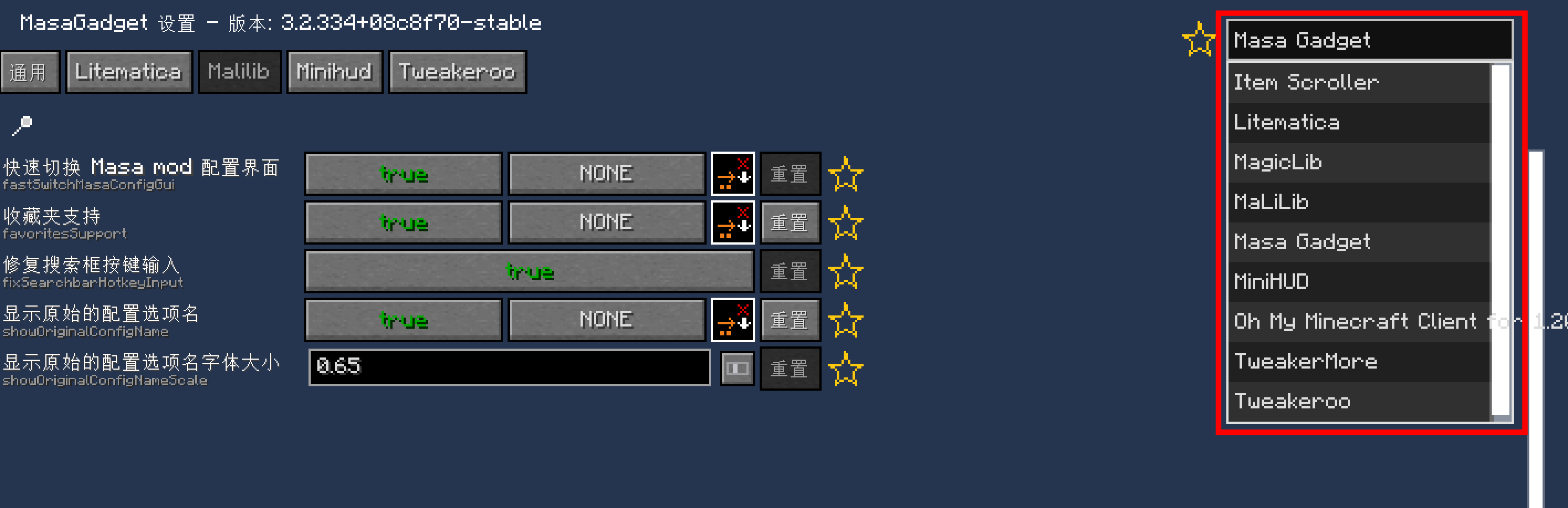
Enabled by default after installing Masa Gadget. You can quickly switch between masamod configuration interfaces using the button in the top-right corner.
No more forgetting which hotkey opens which mod's settings.
// IMG_LOAD
Enabled by default after installing Masa Gadget. You can quickly switch between masamod configuration interfaces using the button in the top-right corner.No more forgetting which hotkey opens which mod's settings.

1.2 Favorites Feature

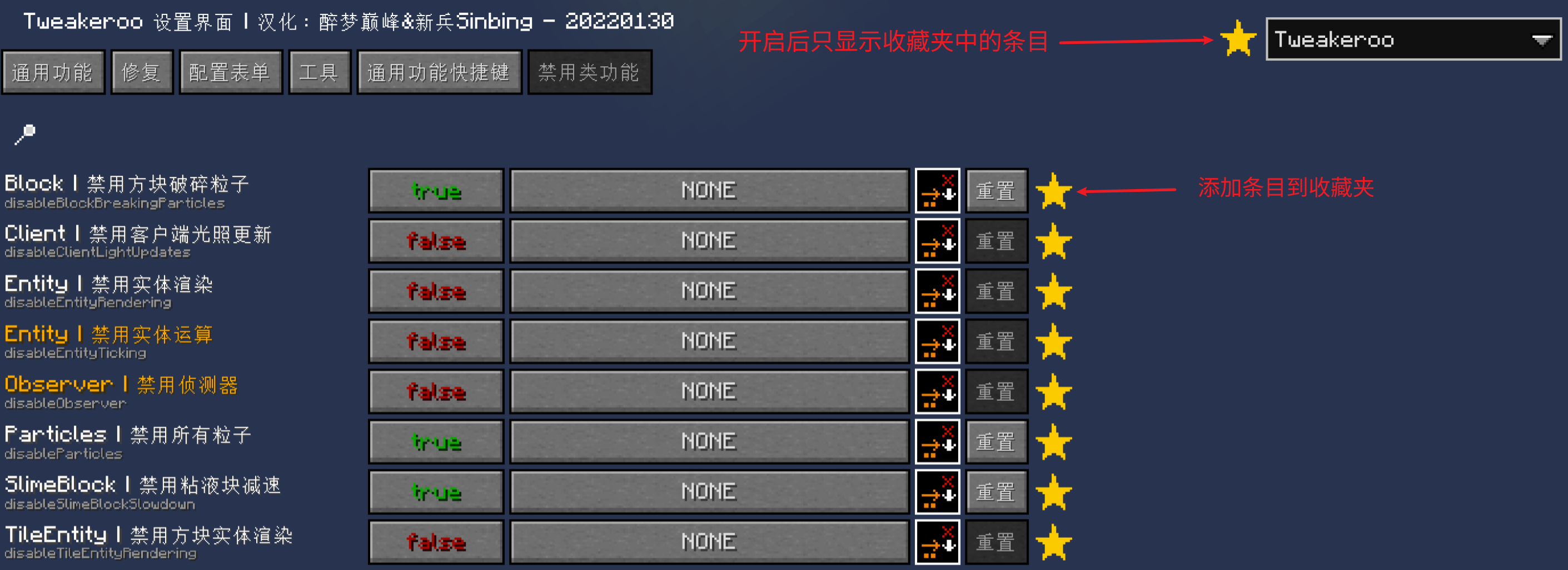
Disabled by default. When enabled, you can add masamod entries to favorites for quick access later. Example:
// IMG_LOAD
Disabled by default. When enabled, you can add masamod entries to favorites for quick access later.

2 Litematica

2.1 Better Easy Place Mode & Easy Place Protocol Fix

Enabled by default. After enabling Easy Place, you can still open containers (may not always work). Fixes some bugs with incorrect block orientation when placing schematics (some errors may still occur).

2.2 Save Container Data When Saving Schematics on Server

Enabled by default. Requires support from plusls-carpet-addition.

3 Minihud

3.1 Minihud Translation

Text displayed by Minihud can be translated. Example:

// IMG_LOAD
Text displayed by Minihud can be translated.

3.2 PCA Sync Protocol for Beehive Data

Pressing the §6Container Preview§r hotkey uses the PCA sync protocol to synchronize beehive and bee nest data.

PrevMicro Timing
Block Events
Next
Litematica Tutorial
Masa Mod
Path: Masamod/MasaGadget.zh.md
SDU-Little-River+1
Word count: 189
Est. read time: 1 min
Last edited: 2026-07-17
Contributors:
  • SSDU-Little-River
  • BBFladderbeanawa
Created:
2025-01-23
Last edited:
2026-07-17
URL:
https://www.techmc.wiki/en/articles/masamod/masa-gadget
Reuse
CC BY-NC-SA 4.0
Graduate Texts in Minecraft

01 Masa Gadget

Masa Gadget adds extra features to various masamods, and also provides standalone functionality such as villager information rendering and spawn location searching.

1 General Features

1.1 Quick Switch Between Masamod Interfaces

Enabled by default after installing Masa Gadget. You can quickly switch between masamod configuration interfaces using the button in the top-right corner.
No more forgetting which hotkey opens which mod's settings.
// IMG_LOAD
Enabled by default after installing Masa Gadget. You can quickly switch between masamod configuration interfaces using the button in the top-right corner.No more forgetting which hotkey opens which mod's settings.

1.2 Favorites Feature

Disabled by default. When enabled, you can add masamod entries to favorites for quick access later. Example:
// IMG_LOAD
Disabled by default. When enabled, you can add masamod entries to favorites for quick access later.

2 Litematica

2.1 Better Easy Place Mode & Easy Place Protocol Fix

Enabled by default. After enabling Easy Place, you can still open containers (may not always work). Fixes some bugs with incorrect block orientation when placing schematics (some errors may still occur).

2.2 Save Container Data When Saving Schematics on Server

Enabled by default. Requires support from plusls-carpet-addition.

3 Minihud

3.1 Minihud Translation

Text displayed by Minihud can be translated. Example:
// IMG_LOAD
Text displayed by Minihud can be translated.

3.2 PCA Sync Protocol for Beehive Data

Pressing the §6Container Preview§r hotkey uses the PCA sync protocol to synchronize beehive and bee nest data.

PrevMicro Timing
Block Events
Next
Litematica Tutorial