GTMC
  • Preface
    • 00Introduction
    • 01Update Concepts and Update Types
    • 02Continuous Block Updates and Analysis Methods
    • 03Special Update Behaviors
    • 01Tick and Inter-Tick Timing
    • 02A First Look at Intra-Tick Timing
    • 03Scheduled Ticks and Scheduled Tick Components
    • 05Block Entities
    • 06Block Events
    • 01Masa Gadget
    • 02Litematica Tutorial
  • 附录
  • A.Stacks
  • B.Glossary

Table of contents

  • Preface
    • 00Introduction
    • 01Update Concepts and Update Types
    • 02Continuous Block Updates and Analysis Methods
    • 03Special Update Behaviors
    • 01Tick and Inter-Tick Timing
    • 02A First Look at Intra-Tick Timing
    • 03Scheduled Ticks and Scheduled Tick Components
    • 05Block Entities
    • 06Block Events
    • 01Masa Gadget
    • 02Litematica Tutorial
  • 附录
  • A.Stacks
  • B.Glossary
Loading article content
Loading
Loading article
GTMC

Graduate Texts in Minecraft

"Curiosity in 'cubic' inch."

Preface

Articles
25
Authors
11
Revised
August 2026

Community

  • About
  • Authors
  • Team
  • QQ Group

Participate

  • Contribute
  • Editorial Policy
  • Issues

Source

  • Repository
  • CC BY-NC-SA 4.0
  • Apache-2.0

Not an official Minecraft product. Not affiliated with Mojang Studios.

Contributors retain copyright. Article content is released under CC BY-NC-SA 4.0 with attribution preserved through article metadata and source history.

© 2024–2026 GTMC Collective21ae2ee

GTMC

  • Articles
  • PDF
  • Glossary
  • About
  • Authors
  • Preface
    • 00Introduction
    • 01Update Concepts and Update Types
    • 02Continuous Block Updates and Analysis Methods
    • 03Special Update Behaviors
    • 01Tick and Inter-Tick Timing
    • 02A First Look at Intra-Tick Timing
    • 03Scheduled Ticks and Scheduled Tick Components
    • 05Block Entities
    • 06Block Events
    • 01Masa Gadget
    • 02Litematica Tutorial
  • 附录
  • A.Stacks
  • B.Glossary

Table of contents

  • Preface
    • 00Introduction
    • 01Update Concepts and Update Types
    • 02Continuous Block Updates and Analysis Methods
    • 03Special Update Behaviors
    • 01Tick and Inter-Tick Timing
    • 02A First Look at Intra-Tick Timing
    • 03Scheduled Ticks and Scheduled Tick Components
    • 05Block Entities
    • 06Block Events
    • 01Masa Gadget
    • 02Litematica Tutorial
  • 附录
  • A.Stacks
  • B.Glossary
Loading article content
Loading
Loading article
CH 01Block Update
Path: BlockUpdate/更新的概念与不同类型的更新.zh.md
SDU-Little-River+5
Word count: 3,640
Est. read time: 17 min
Last edited: 2026-07-13
Contributors:
  • SSDU-Little-River
  • BBFladderbeanawa
  • MMorningMC
  • ttanhHeng
  • hhotpad100c
  • PPetris
Created:
2024-12-08
Last edited:
2026-07-13
URL:
https://www.techmc.wiki/en/articles/block-update/update-concepts
Reuse
CC BY-NC-SA 4.0
Illegal-state blocks missing updates
Code basisMC 1.20.1
YARN
11 references

01 Update Concepts and Update Types

This article is an introduction to update theory.

Basics

  • Understanding Updates
  • Different Types of Updates
  • Block Self-Inspection Behavior

Advanced (Source Code Analysis)

  • Brief Overview of NC Update and PP Update Invocation and Response
  • Invocation of Block Self-Inspection

1 Updates in the General Sense

In Minecraft, blocks establish connections with each other through mutual "notifications".

Suppose you place a note block on the ground, then place a redstone block next to it. The note block plays a sound. How did it know to do that? Does it constantly ask the player whether it should make a sound? Obviously not. The note block played because the redstone block notified it: something changed nearby.

This notification behavior is what we call an update in the general sense.

Note that the redstone block doesn't say "I am a redstone block" or "this changed from air to a redstone block"—it simply signals that something changed. In other words, update behavior carries no details about what caused it.

2 Types of Updates

In Minecraft, there is more than one type of update.

Let's continue with the example above. Now consider another scenario: you place a redstone block on the ground, then place a fence gate one block away, and a note block between them. The note block doesn't play. Right-clicking the gate to open it still doesn't trigger the note block. Both placing the redstone block and opening the gate are changes that should notify the note block. Why doesn't it play? Breaking the fence gate, however, does trigger it.

Why is this?

You might wonder: perhaps the notifications from placing a redstone block and opening a fence gate differ somehow.

These two notifications are indeed different. They are called NC Update and PP Update, respectively.

You might also wonder: why doesn't the note block play immediately when placed? Doesn't it check its state when it first appears? It doesn't—note blocks skip this check.

This self-check on placement is called self-inspection. Self-inspection is a special type of update. Note blocks do not perform self-inspection.

You may already know that comparators detect the number of items in a container, outputting redstone signals of strength 0–15 based on the item count. When item count changes, the container doesn't need to emit an NC Update or PP Update—only the internal quantity changed, with little effect on surrounding blocks. Yet comparators still update their output signal strength, meaning they receive change notifications. Containers emit a special notification when item count changes.

Such notifications are called Comparator Updates.

3 NC Update

3.1 NC Update: Concept and Behavior

Blocks emit NC Updates when they are placed, broken, or undergo changes that significantly affect surrounding blocks. For example:

  • Placement and breaking of blocks
  • Changes in redstone dust power level
  • Piston push/pull*
  • ...

In the official deobfuscation, NC Update is neighborChanged, same as the mcp deobfuscation. In yarn deobfuscation it's called updateNeighbors

However, some changes do not emit NC Updates, the most common being:

  • Connection state changes of connectable blocks, such as glass panes connecting to other blocks, various walls connecting to other blocks
  • Connection state changes of redstone dust, such as redstone dust connected to north-south redstone dust also connecting to east redstone dust
  • Opening/closing of trapdoors and fence gates
  • Activation state changes of dispensers and droppers (! Important)
  • Activation state changes of hoppers
  • ...

The specific behavior of pistons is not within the scope of this article.

A block that emits an NC Update is called an update source1. For most blocks, the update source is the block itself when emitting updates.

When an update source emits an NC Update, it follows the order West East Down Up North South, sending NC Updates to each immediately adjacent block in turn.

Some blocks have more than one update source when emitting NC Updates, with special update sources and ranges:

  • Redstone dust power level changes are second-order neighbor updates2.
  • Directional redstone components (repeaters, comparators, observers) first update the block their output end points to, then emit NC Updates with that block as the update source. They do not update themselves.
  • When flat powered rails switch activation state, they first generate NC Updates with themselves as the update source, then generate NC Updates with the block below as the update source.
  • When sloped powered rails switch activation state, the update order is up, middle, down, middle, down, up (self-source abbreviated middle, above-source up, below-source down; see [Update Behavior of Sloped Rails](./特殊的更新行为.md#3.2-:advanced 斜侧铁轨的更新行为)).

These are common and typical examples. More special cases can be found at Wiki-Block Update

3.2 Properties of NC Update, QC Activation, BUD Devices

The most typical property of NC Updates is their ability to trigger BUD devices.

A block whose current state differs from its intended state is a BUD device (Block Update Detector). This state is called a BUD state.

The most typical BUD device is a piston that is powered (receiving a redstone signal) but not activated (not extended). Pistons have a special powering range: they count as powered when both the piston block and the block above it (even air) receive power. Powering a piston via the air above it is called QC powering. When such a piston extends after receiving an NC Update, that's QC activation.

QC (quasi-connectivity) is a property shared by pistons, sticky pistons, droppers, and dispensers.

Consider a redstone block placed diagonally above a piston. The piston is now QC powered. However, placing the redstone block only updates the six adjacent blocks—the piston isn't among them, so nothing notifies it of the signal. The piston should extend but hasn't, because it received no NC Update. Its current state differs from its intended state—the piston is in a BUD state and acts as a BUD device.

Placing a block next to the piston emits an NC Update. The piston receives it and exits the BUD state.

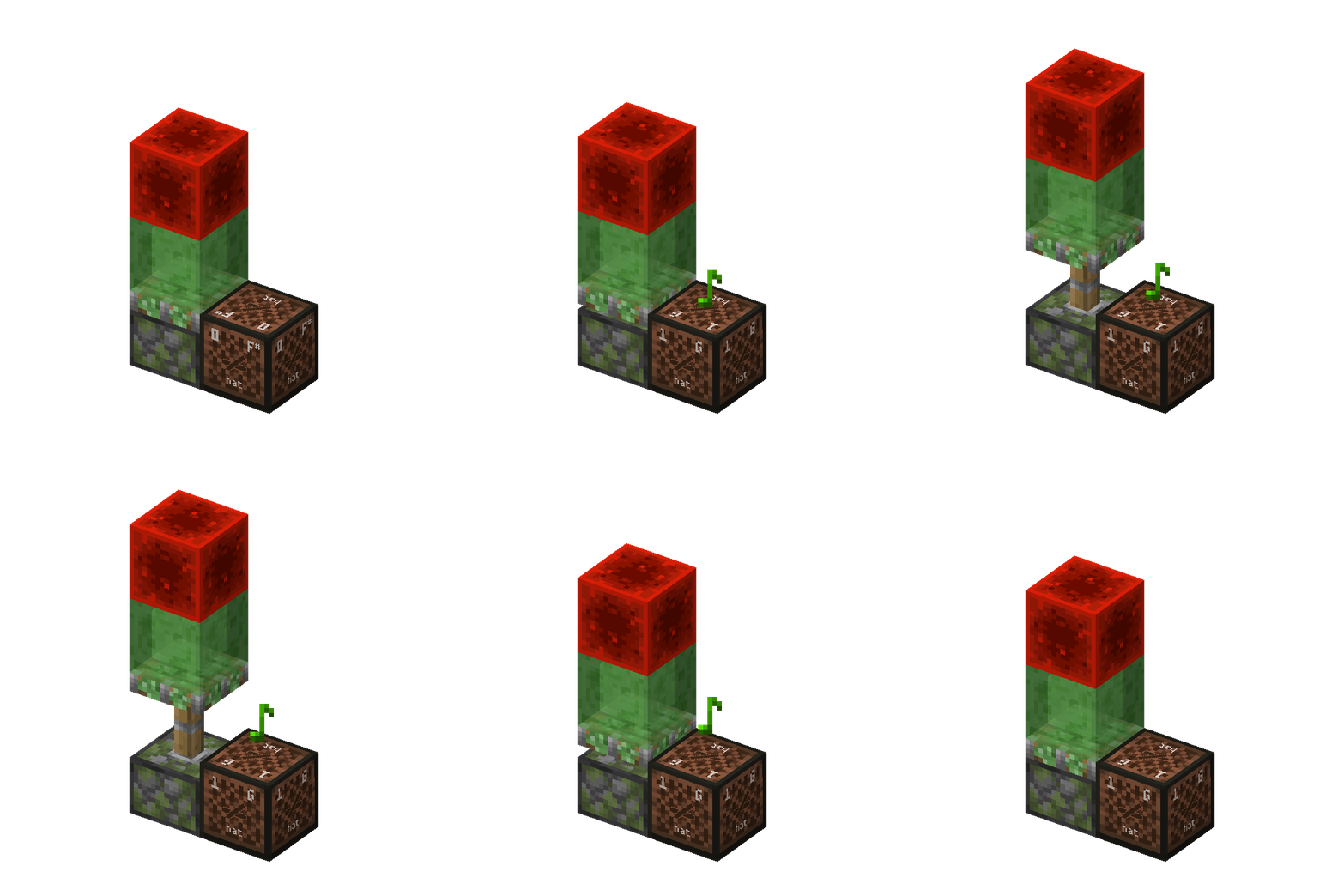
The simplest commonly used self-resetting BUD device is as follows:
// IMG_LOAD
Example

In the image, the redstone block QC powers the sticky piston below. When the sticky piston receives an NC Update and extends, the redstone block no longer powers it. The sticky piston retracts, and the redstone block QC powers it again.3

4 PP Update

4.1 PP Update: Concept and Behavior

Almost all changes emit PP Updates, with a few exceptions:

  • Placing blocks using commands
  • Changing block states using the debug stick

There is one additional exception:

  • When a sticky piston pushes an activating observer, the observer doesn't emit a PP Update when it arrives.

In the official deobfuscation, PP Update is updateShape, meaning update shape (for example, the shape of various walls, opening/closing of trapdoors, activation state changes of redstone components can all be called "shape" here). This deobfuscation name is more helpful for understanding PP Updates. The PP Update naming comes from the postPlacement method in mcp deobfuscation. In yarn deobfuscation it's called getStateForNeighborUpdate

Unlike NC Updates, the order of PP Updates is West East North South Down Up.

The behaviors listed above that do not emit NC Updates are typical cases that emit PP Updates but not NC Updates. Similarly, BUD devices cannot detect PP Updates.

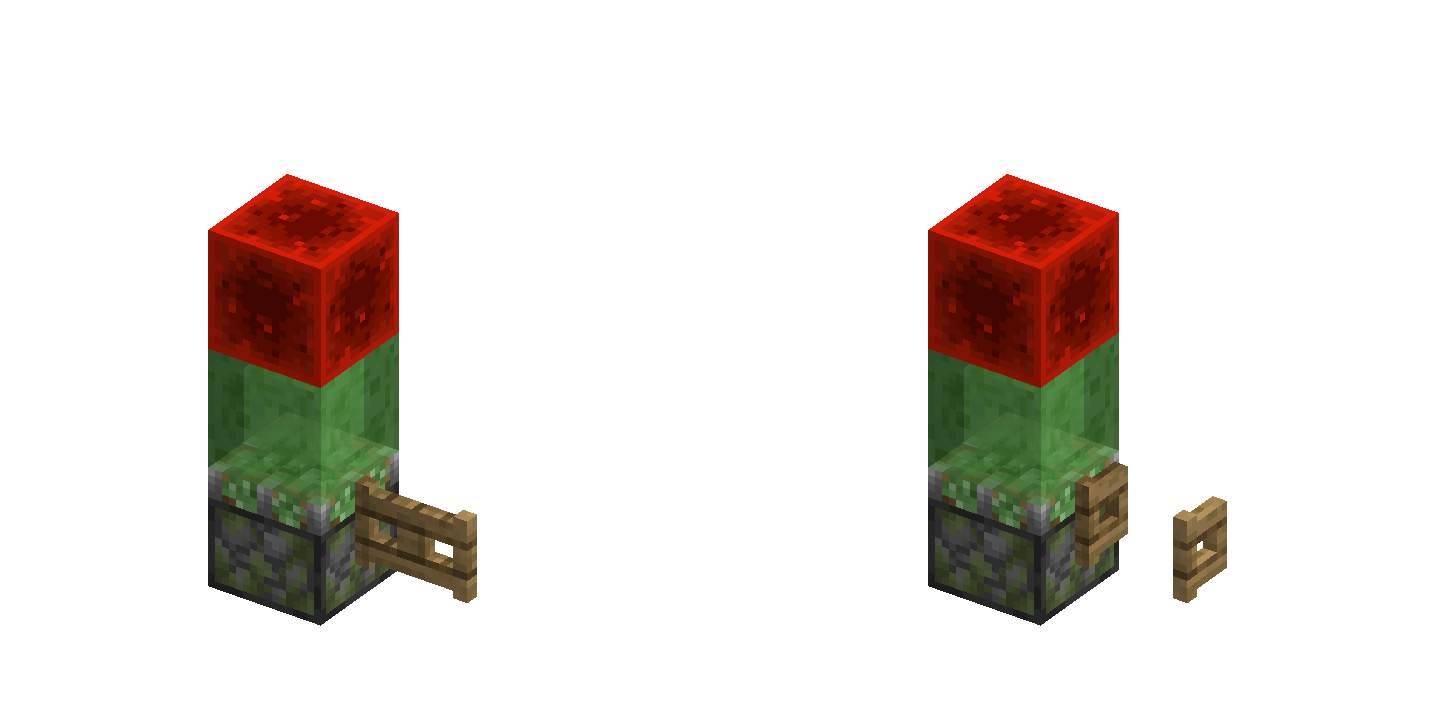
For example, the fence gate state change emits a PP Update, but the piston BUD device won't detect it.
// IMG_LOAD
Example

Except when placing or breaking blocks, most redstone components have different NC and PP Update ranges. For example, a repeater's NC Update range covers the output end and its neighbors (excluding the repeater itself), while its PP Update range covers the repeater's own neighbors.

PP Updates reflect changes to the block itself; NC Updates notify neighboring blocks that may need to change state.

For example, a repeater's on/off state is a change to itself, communicated via PP Updates. When a repeater turns on, it powers the block at its output end. If that block can transmit redstone signals, it propagates them to its neighbors—so the repeater may affect both the output block and its neighbors. The repeater uses NC Updates to notify potentially affected blocks to recheck their state.

Another example: when a dropper fires and drops an item, the action doesn't affect surrounding blocks4, so dropper activation doesn't emit NC Updates. However, the dropper's activation state does change, so it emits PP Updates.

This makes the distinction between PP and NC Updates—and their different ranges—clearer.

4.2 Properties of PP Update

Since BUD devices cannot detect PP Updates, what can?

Observers. The face detects PP Updates; the red-dot side outputs a redstone signal.

Observers respond only to PP Updates.5 Since NC Updates usually accompany PP Updates, this distinction isn't always obvious. But it can be demonstrated: an observer facing a repeater activates when the repeater toggles; an observer facing the air at the repeater's output does not. Air doesn't change, so the observer doesn't respond.

Using BUD devices and observers together, you can test NC and PP Update ranges without reading source code.

5 Comparator Update

5.1 Comparator Update: Concept and Behavior

As the name suggests, Comparator Updates are specifically for comparators.

The following behaviors emit Comparator Updates:

  • General containers (chests, barrels, hoppers, etc.) when item count changes. Signal strength calculation: see below.
  • Containers in a broader sense—blocks with a "capacity" concept such as composters (signal strength equals composting level, range 0–9) and cauldrons (signal strength equals liquid level, range 0–3).
  • Item frames. Output signal strength depends on the rotation angle of the displayed item (strength 1–8). When no item is placed, signal strength is 0.
  • Lecterns. Signal strength calculation: see below.
  • Detector rails with dropped items above them.
  • Detector rails with minecarts containing items (chest minecart, hopper minecart). When item count changes, a Comparator Update emits after 20 gt. Signal strength calculation is the same as general containers.
  • Chiseled bookshelves (1.20+). Signal strength equals the position of the last book placed or removed (first row 1–3, second row 2–6).

Comparators detect container capacity both directly and through an intervening block that transmits redstone signals. Comparator Updates reach comparators horizontally adjacent to the container or within second-order range through a signal-transmitting block. They do not affect non-comparator blocks.

5.2 Comparator Signal Strength Calculation

For general containers:

  • Output signal strength = floor of average fill ratio of each item slot * 14. If the container is not empty, add +1. Empty container outputs 0; non-empty container outputs the average fill ratio mapped to 1–15, floored.

For lecterns:

  • When no book is placed on the lectern, output signal strength is 0.
  • When a book is placed on the lectern and the book has only one page, output signal strength is 15.
  • When a book is placed on the lectern and the book has more than one page, output signal strength is floor of current page number / (total pages - 1) * 14 then +1. Here "current page number" starts from 0; if counting from 1 as players see, it's equivalent to (current page - 1) / (total pages - 1) * 14 floored then +1.
  • Empty lectern outputs 0; non-empty lectern outputs the current page ratio mapped to 1–15, floored.

5.3 Comparator Update Detector (CUD)

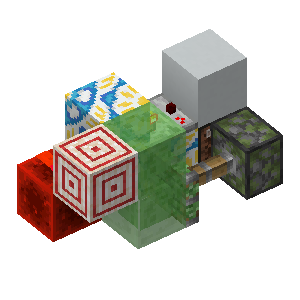
When a comparator's current state differs from its intended state, it constitutes a Comparator Update Detector (CUD). The simplest example: use a comparator to detect a filled composter through an intervening block, then push the composter away with a piston. The comparator still outputs a signal.

Other resettable CUD structures are complex; they are demonstrated here but not explained in detail.
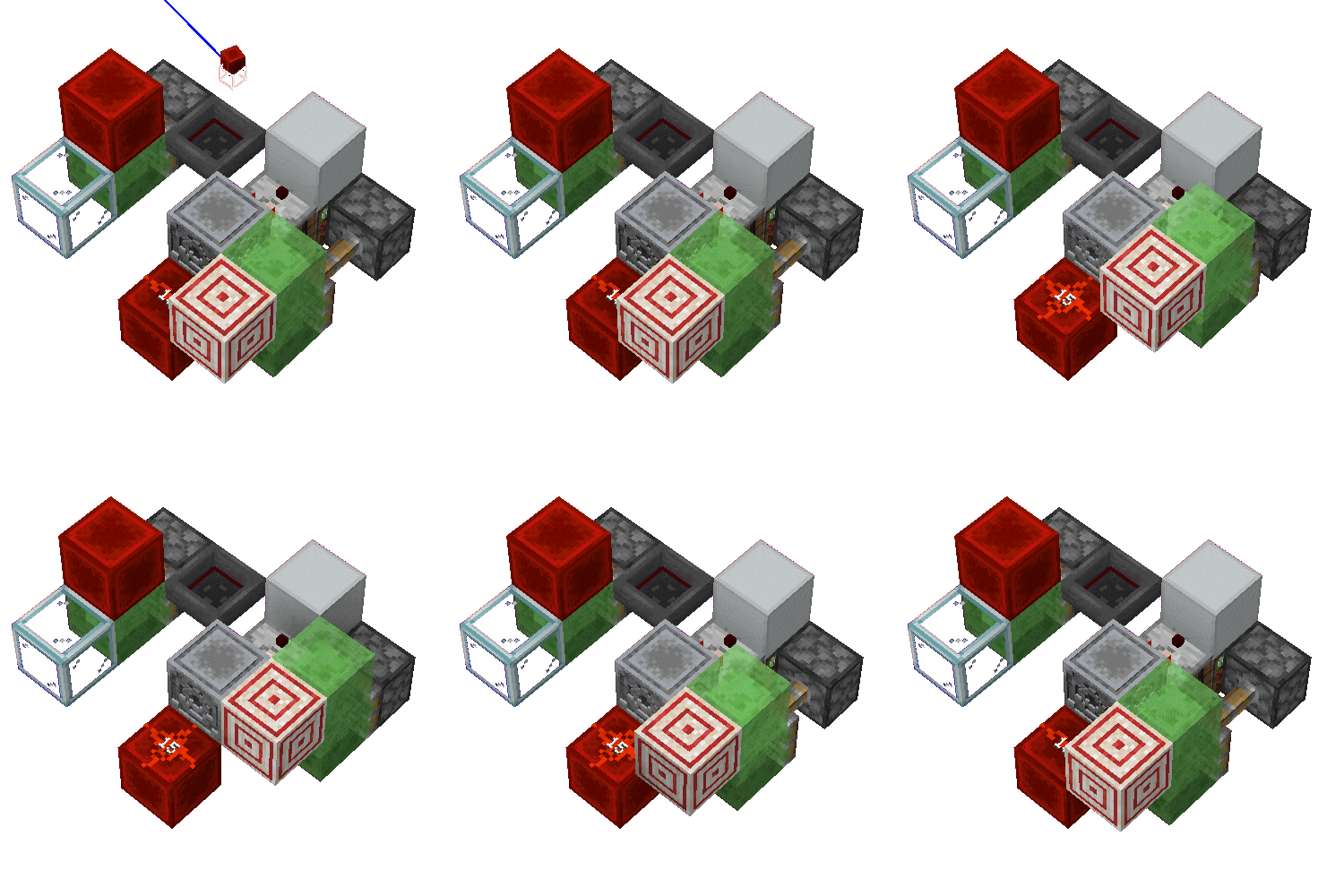
// IMG_LOAD
Dust turning CUD

// IMG_LOAD
Dust turning CUD in actual operation

Image shows a CUD based on redstone dust turning.

You can see the BUD didn't activate, while the CUD detected the Comparator Update emitted by the hopper.

6 Block Self-Inspection

Redstone components self-inspect when placed—checking whether they should change state. For example, place a redstone block, then place a repeater with its input adjacent to it. The repeater hasn't received an update, yet it lights up. It self-inspected on placement, found it should power on, and did.

A piston arriving at its position counts as "being placed," so pistons self-inspect once after extending and once after retracting.

AdvancedGoes deeper into the underlying mechanicsSkip

7 Invocation and Response of NC Update and PP Update

7.1 setBlockState Function

setBlockState controls update behavior through a bitflags parameter (i.e., FLAG) in the World class (World.java):

java
MC 1.20.1
YARN
public boolean setBlockState(BlockPos pos, BlockState state, int flags, int maxUpdateDepth) { ... BlockState blockState = worldChunk.setBlockState(pos, state, (flags & Block.MOVED) != 0); if (blockState != null) { BlockState blockState2 = this.getBlockState(pos); if (blockState2 == state) { ... // NC Update invocation controlled by FLAG if ((flags & Block.NOTIFY_NEIGHBORS) != 0) { this.updateNeighbors(pos, blockState.getBlock()); if (!this.isClient && state.hasComparatorOutput()) { this.updateComparators(pos, block); } } // PP Update invocation controlled by FLAG if ((flags & Block.FORCE_STATE) == 0 && maxUpdateDepth > 0) { int i = flags & ~(Block.NOTIFY_NEIGHBORS | Block.SKIP_DROPS); blockState.prepare(this, pos, i, maxUpdateDepth - 1); state.updateNeighbors(this, pos, i, maxUpdateDepth - 1); state.prepare(this, pos, i, maxUpdateDepth - 1); } ... } return true; } return false; }
// SYNTAX_HIGHLIGHT

7.2 Invocation and Response of NC Update

In the source code, NC Updates are mainly invoked through two methods:

  • updateNeighbor and its derivatives
  • setBlockState with flag where bit0 = 1

updateNeighbor and its derivatives: updateNeighbor, updateNeighborsExcept, updateNeighborsAlways.

updateNeighbor is the most fundamental method, taking three parameters: pos (coordinates of the block to update), sourceBlock (block type emitting the update), and sourcePos (coordinates of the update source).

updateNeighborsAlways and updateNeighborsExcept perform updates by calling NeighborUpdater.updateNeighbors in NeighborUpdater.java:

java
MC 1.20.1
YARN
public static final Direction[] UPDATE_ORDER = new Direction[]{Direction.WEST, Direction.EAST, Direction.DOWN, Direction.UP, Direction.NORTH, Direction.SOUTH};default public void updateNeighbors(BlockPos pos, Block sourceBlock, @Nullable Direction except) { for (Direction direction : UPDATE_ORDER) { if (direction == except) continue; this.updateNeighbor(pos.offset(direction), sourceBlock, pos); }}
// SYNTAX_HIGHLIGHT

Therefore, the NC Update order is West East Down Up North South.

Defined in Block.java:

java
MC 1.20.1
YARN
// Broadcast block update events to surrounding blockspublic static final int NOTIFY_NEIGHBORS = 1;// Notify listeners and clients that need to react to this block changepublic static final int NOTIFY_LISTENERS = 2;// Default behavior when block changes: same effect as enabling both NOTIFY_NEIGHBORS and NOTIFY_LISTENERS above.public static final int NOTIFY_ALL = 3;// Skip updates, force set block state.public static final int FORCE_STATE = 16;
// SYNTAX_HIGHLIGHT

Of these methods, only the sourcePos in updateNeighborsAlways/updateNeighborsExcept and the pos in setBlockState qualify as an "update source"—the core that updates the six adjacent blocks (or all but one direction) around a block. updateNeighbor is a simpler, direct update.

For PP Updates only, FLAG is usually NOTIFY_LISTENERS; when emitting both PP and NC Updates, FLAG is usually NOTIFY_ALL. Some blocks that override onBlockAdded have different invocation methods (see below).

Each block responds to NC Updates through its neighborUpdate function.

7.3 Invocation of PP Update

PP Updates are invoked through setBlockState. When bit4 = 0 in FLAG, a PP Update is generated.

state.updateNeighbors is defined in AbstractBlockState (AbstractBlock.java):

java
MC 1.20.1
YARN
public final void updateNeighbors(WorldAccess world, BlockPos pos, int flags, int maxUpdateDepth) { BlockPos.Mutable mutable = new BlockPos.Mutable(); for (Direction direction : DIRECTIONS) { mutable.set((Vec3i)pos, direction); world.replaceWithStateForNeighborUpdate(direction.getOpposite(), this.asBlockState(), mutable, pos, flags, maxUpdateDepth); }}
// SYNTAX_HIGHLIGHT

AbstractBlock defines:

java
MC 1.20.1
YARN
protected static final Direction[] DIRECTIONS = new Direction[]{Direction.WEST, Direction.EAST, Direction.NORTH, Direction.SOUTH, Direction.DOWN, Direction.UP};
// SYNTAX_HIGHLIGHT

Therefore, PP Update order is West East North South Down Up.

world.replaceWithStateForNeighborUpdate:

java
MC 1.20.1
YARN
default public void replaceWithStateForNeighborUpdate(Direction direction, BlockState neighborState, BlockPos pos, BlockPos neighborPos, int flags, int maxUpdateDepth) { NeighborUpdater.replaceWithStateForNeighborUpdate(this, direction, neighborState, pos, neighborPos, flags, maxUpdateDepth - 1);}
// SYNTAX_HIGHLIGHT

This calls replaceWithStateForNeighborUpdate in NeighborUpdater:

java
MC 1.20.1
YARN
public static void replaceWithStateForNeighborUpdate(WorldAccess world, Direction direction, BlockState neighborState, BlockPos pos, BlockPos neighborPos, int flags, int maxUpdateDepth) { BlockState blockState = world.getBlockState(pos); BlockState blockState2 = blockState.getStateForNeighborUpdate(direction, neighborState, world, pos, neighborPos); Block.replace(blockState, blockState2, world, pos, flags, maxUpdateDepth);}
// SYNTAX_HIGHLIGHT

Finally, it calls each block's getStateForNeighborUpdate method—the method by which blocks respond to PP Updates.

7.4 NC Update and PP Update Invocation for Redstone Components

For most redstone components, setBlockState passes FLAG=2. NC Updates are emitted by worldChunk.setBlockState calling the overridden onBlockAdded method:

In worldChunk.setBlockState:

java
MC 1.20.1
YARN
public BlockState setBlockState(BlockPos pos, BlockState state, boolean moved) { ... if (!this.world.isClient) { state.onBlockAdded(this.world, pos, blockState, moved); } ... return blockState;}
// SYNTAX_HIGHLIGHT

PP Updates are normally invoked by setBlockState controlled by FLAG.

Using the redstone repeater as an example, in AbstractRedstoneGateBlock (AbstractRedstoneGateBlock.java), which the repeater inherits:

java
MC 1.20.1
YARN
public void scheduledTick(BlockState state, ServerWorld world, BlockPos pos, Random random) { if (this.isLocked(world, pos, state)) { return; } boolean bl = state.get(POWERED); boolean bl2 = this.hasPower(world, pos, state); if (bl && !bl2) { world.setBlockState(pos, (BlockState)state.with(POWERED, false), Block.NOTIFY_LISTENERS); } else if (!bl) { world.setBlockState(pos, (BlockState)state.with(POWERED, true), Block.NOTIFY_LISTENERS); if (!bl2) { world.scheduleBlockTick(pos, this, this.getUpdateDelayInternal(state), TickPriority.VERY_HIGH); } }}@Overridepublic void onBlockAdded(BlockState state, World world, BlockPos pos, BlockState oldState, boolean notify) { this.updateTarget(world, pos, state);} protected void updateTarget(World world, BlockPos pos, BlockState state) { Direction direction = state.get(FACING); BlockPos blockPos = pos.offset(direction.getOpposite()); world.updateNeighbor(blockPos, this, pos); world.updateNeighborsExcept(blockPos, this, direction);}
// SYNTAX_HIGHLIGHT

scheduledTick is called when the repeater executes a scheduled tick. It calls setBlockState, which calls worldChunk.setBlockState, which in turn calls the overridden onBlockAdded—generating NC Updates for the block at the repeater's output end and its neighbors (excluding the repeater itself). Then setBlockState calls state.updateNeighbors to generate PP Updates.

7.5 Order of NC Update and PP Update

For most blocks using setBlockState, NC Updates fire before PP Updates. This ordering matters because it affects subsequent update chains. This article does not cover continuous block updates.

7.6 Observer's NC and PP Update

The observer is an exception. It doesn't call NC Updates in the onBlockAdded method, but directly calls setBlockState first in scheduledTick to emit PP Updates, then calls updateNeighbors to emit NC Updates. Therefore, observers follow a PP-first-then-NC order when turning on and off.

In the observer's onBlockAdded:

java
MC 1.20.1
YARN
@Overridepublic void onBlockAdded(BlockState state, World world, BlockPos pos, BlockState oldState, boolean notify) { if (state.isOf(oldState.getBlock())) { return; } if (!world.isClient() && state.get(POWERED).booleanValue() && !world.getBlockTickScheduler().isQueued(pos, this)) { BlockState blockState = (BlockState)state.with(POWERED, false); world.setBlockState(pos, blockState, Block.NOTIFY_LISTENERS | Block.FORCE_STATE); this.updateNeighbors(world, pos, blockState); }}
// SYNTAX_HIGHLIGHT

The first if contains state.isOf(oldState.getBlock()) which is used to determine whether the block at the current position was still the current block before its state was changed. For example, if a piston pushes an observer, the position where the observer arrives is air before the change and observer after the change, at which point this function returns true. While a normal observer always returns false when calling this function.

Therefore, the observer's onBlockAdded method usually doesn't execute subsequent content, and thus doesn't emit NC Updates from onBlockAdded. Instead, as mentioned above, it "directly calls setBlockState first in scheduledTick to emit PP Updates, then calls updateNeighbors to emit NC Updates."

End of advanced section
AdvancedGoes deeper into the underlying mechanicsSkip

8 Invocation of Block Self-Inspection

Blocks are called with the onPlaced function when placed, and redstone components complete self-inspection in this function. For example, the redstone repeater:

java
MC 1.20.1
YARN
@Overridepublic void onPlaced(World world, BlockPos pos, BlockState state, LivingEntity placer, ItemStack itemStack) { if (this.hasPower(world, pos, state)) { world.scheduleBlockTick(pos, this, 1); }}
// SYNTAX_HIGHLIGHT

The source code for piston self-inspection is not within the scope of this article.

End of advanced section
AdvancedGoes deeper into the underlying mechanicsSkip

9 Control of Update Behavior

In the ServerWorld.setBlockState method, an integer parameter is passed in: flag
This flag is actually treated as a 9-bit binary code, where each of the 9 bits controls different behaviors

End of advanced section

10 Definition of flag's 9-bit Flags

  • Bit 0: Emit neighbor updates.
  • Bit 1: Notify listeners (server and client).
  • Bit 2: Suppress client rendering.
  • Bit 3: Force client sync redraw.
  • Bit 4: Force state storage.
  • Bit 5: Prevent item drops.
  • Bit 6: Mark piston movement.
  • Bit 7: Light update.
  • Bit 8: Trigger behavior side effects.

11 Constant Explanation

Multiple update behaviors are defined in Block.java:

ConstantValueBinary (9 bits)BehaviorUsage
NOTIFY_NEIGHBORS1000000001Trigger surrounding block updatesCommonly called NC Update
NOTIFY_LISTENERS2000000010Notify server and client listenersSync state
NO_REDRAW4000000100Prevent client redraw (used with NOTIFY_LISTENERS)Invisible update
REDRAW_ON_MAIN_THREAD8000001000Force client sync redrawBlock appearance change
FORCE_STATE16000010000Bypass virtual state, directly store specified stateForce block replacement
SKIP_DROPS32000100000Prevent container blocks from dropping items when brokenCommand replacement etc.
MOVED64001000000Mark block moved by pistonPiston push/pull logic trigger

| SKIP_REDSTONE_WIRE_STATE_REPLACEMENT | 128 | 010000000 | Skip redstone wire state replacement | - |
| SKIP_BLOCK_ENTITY_REPLACED_CALLBACK | 256 | 100000000 | Skip block entity replacement callback | - |
| SKIP_BLOCK_ADDED_CALLBACK | 512 | 1000000000 | Skip self-inspection | Don't trigger onBlockAdded |
| SKIP_REDRAW_AND_BLOCK_ENTITY_REPLACED_CALLBACK | 260 | 100000100 | Combine NO_REDRAW and SKIP_BLOCK_ENTITY_REPLACED_CALLBACK | Minimize update, skip rendering and entity callback |
| NOTIFY_ALL | 3 | 000000011 | Combine NOTIFY_NEIGHBORS and NOTIFY_LISTENERS | Default full server-side update |
| NOTIFY_ALL_AND_REDRAW | 11 | 000001011 | Combine NOTIFY_ALL and REDRAW_ON_MAIN_THREAD | Server update and force client redraw |
| FORCE_STATE_AND_SKIP_CALLBACKS_AND_DROPS | 816 | 1100110000 | Combine FORCE_STATE, SKIP_DROPS, MOVED, SKIP_BLOCK_ADDED_CALLBACK | Force change, skip self-inspection and drops |

Footnotes

  1. Understanding of update source is not explained extensively in the basics section, and not all NC Updates have an update source. See Advanced Section. ↩

  2. Redstone dust has more complex update behavior, not expanded in this article. May add redstone dust special DLC later ↩

  3. Brief explanation of the piston mechanics in the 1.3.2 BUD device (for reference only). The sticky piston doesn't receive any NC Update while extending, so it won't drop the block mid-extension. After extending into position, it triggers self-inspection, finds it's not powered, and retracts. During retraction, the piston block arrives first (due to sticky piston block arrival order). Self-inspection triggers, but the redstone block hasn't arrived yet (still in block entity state). The redstone block arrives later, so the sticky piston won't extend again from self-inspection. ↩

  4. Not considering items being picked up by hoppers. Hopper pickup is the hopper's own behavior, not controlled by updates. ↩

  5. This is considered only from the perspective of update types. Observers only decide whether to change state when receiving PP Updates. If "respond" is taken broadly to mean "observer changes," then besides scheduled tick behavior, when an observer is pushed into position by a piston, it calls its own onBlockAdded method. Only when there's no scheduled tick queued at the arrival position and the observer's original state was lit does it call setBlockstate internally, ending in the extinguished state (no scheduled tick exists). Observers originally extinguished produce no changes. The scheduled tick added when an extinguished observer arrives via piston comes from the tile entity's "update" postProcessState, which still calls the observer's PP response function getStateForNeighborUpdate. ↩

Prev
Introduction
Next
Continuous Block Updates and Analysis Methods
CH 01Block Update
Path: BlockUpdate/更新的概念与不同类型的更新.zh.md
SDU-Little-River+5
Word count: 3,640
Est. read time: 17 min
Last edited: 2026-07-13
Contributors:
  • SSDU-Little-River
  • BBFladderbeanawa
  • MMorningMC
  • ttanhHeng
  • hhotpad100c
  • PPetris
Created:
2024-12-08
Last edited:
2026-07-13
URL:
https://www.techmc.wiki/en/articles/block-update/update-concepts
Reuse
CC BY-NC-SA 4.0
Illegal-state blocks missing updates
Code basisMC 1.20.1
YARN
11 references

01 Update Concepts and Update Types

This article is an introduction to update theory.

Basics

  • Understanding Updates
  • Different Types of Updates
  • Block Self-Inspection Behavior

Advanced (Source Code Analysis)

  • Brief Overview of NC Update and PP Update Invocation and Response
  • Invocation of Block Self-Inspection

1 Updates in the General Sense

In Minecraft, blocks establish connections with each other through mutual "notifications".

Suppose you place a note block on the ground, then place a redstone block next to it. The note block plays a sound. How did it know to do that? Does it constantly ask the player whether it should make a sound? Obviously not. The note block played because the redstone block notified it: something changed nearby.

This notification behavior is what we call an update in the general sense.

Note that the redstone block doesn't say "I am a redstone block" or "this changed from air to a redstone block"—it simply signals that something changed. In other words, update behavior carries no details about what caused it.

2 Types of Updates

In Minecraft, there is more than one type of update.

Let's continue with the example above. Now consider another scenario: you place a redstone block on the ground, then place a fence gate one block away, and a note block between them. The note block doesn't play. Right-clicking the gate to open it still doesn't trigger the note block. Both placing the redstone block and opening the gate are changes that should notify the note block. Why doesn't it play? Breaking the fence gate, however, does trigger it.

Why is this?

You might wonder: perhaps the notifications from placing a redstone block and opening a fence gate differ somehow.

These two notifications are indeed different. They are called NC Update and PP Update, respectively.

You might also wonder: why doesn't the note block play immediately when placed? Doesn't it check its state when it first appears? It doesn't—note blocks skip this check.

This self-check on placement is called self-inspection. Self-inspection is a special type of update. Note blocks do not perform self-inspection.

You may already know that comparators detect the number of items in a container, outputting redstone signals of strength 0–15 based on the item count. When item count changes, the container doesn't need to emit an NC Update or PP Update—only the internal quantity changed, with little effect on surrounding blocks. Yet comparators still update their output signal strength, meaning they receive change notifications. Containers emit a special notification when item count changes.

Such notifications are called Comparator Updates.

3 NC Update

3.1 NC Update: Concept and Behavior

Blocks emit NC Updates when they are placed, broken, or undergo changes that significantly affect surrounding blocks. For example:

  • Placement and breaking of blocks
  • Changes in redstone dust power level
  • Piston push/pull*
  • ...

In the official deobfuscation, NC Update is neighborChanged, same as the mcp deobfuscation. In yarn deobfuscation it's called updateNeighbors

However, some changes do not emit NC Updates, the most common being:

  • Connection state changes of connectable blocks, such as glass panes connecting to other blocks, various walls connecting to other blocks
  • Connection state changes of redstone dust, such as redstone dust connected to north-south redstone dust also connecting to east redstone dust
  • Opening/closing of trapdoors and fence gates
  • Activation state changes of dispensers and droppers (! Important)
  • Activation state changes of hoppers
  • ...

The specific behavior of pistons is not within the scope of this article.

A block that emits an NC Update is called an update source1. For most blocks, the update source is the block itself when emitting updates.

When an update source emits an NC Update, it follows the order West East Down Up North South, sending NC Updates to each immediately adjacent block in turn.

Some blocks have more than one update source when emitting NC Updates, with special update sources and ranges:

  • Redstone dust power level changes are second-order neighbor updates2.
  • Directional redstone components (repeaters, comparators, observers) first update the block their output end points to, then emit NC Updates with that block as the update source. They do not update themselves.
  • When flat powered rails switch activation state, they first generate NC Updates with themselves as the update source, then generate NC Updates with the block below as the update source.
  • When sloped powered rails switch activation state, the update order is up, middle, down, middle, down, up (self-source abbreviated middle, above-source up, below-source down; see [Update Behavior of Sloped Rails](./特殊的更新行为.md#3.2-:advanced 斜侧铁轨的更新行为)).

These are common and typical examples. More special cases can be found at Wiki-Block Update

3.2 Properties of NC Update, QC Activation, BUD Devices

The most typical property of NC Updates is their ability to trigger BUD devices.

A block whose current state differs from its intended state is a BUD device (Block Update Detector). This state is called a BUD state.

The most typical BUD device is a piston that is powered (receiving a redstone signal) but not activated (not extended). Pistons have a special powering range: they count as powered when both the piston block and the block above it (even air) receive power. Powering a piston via the air above it is called QC powering. When such a piston extends after receiving an NC Update, that's QC activation.

QC (quasi-connectivity) is a property shared by pistons, sticky pistons, droppers, and dispensers.

Consider a redstone block placed diagonally above a piston. The piston is now QC powered. However, placing the redstone block only updates the six adjacent blocks—the piston isn't among them, so nothing notifies it of the signal. The piston should extend but hasn't, because it received no NC Update. Its current state differs from its intended state—the piston is in a BUD state and acts as a BUD device.

Placing a block next to the piston emits an NC Update. The piston receives it and exits the BUD state.

The simplest commonly used self-resetting BUD device is as follows:

// IMG_LOAD
Example

In the image, the redstone block QC powers the sticky piston below. When the sticky piston receives an NC Update and extends, the redstone block no longer powers it. The sticky piston retracts, and the redstone block QC powers it again.3

4 PP Update

4.1 PP Update: Concept and Behavior

Almost all changes emit PP Updates, with a few exceptions:

  • Placing blocks using commands
  • Changing block states using the debug stick

There is one additional exception:

  • When a sticky piston pushes an activating observer, the observer doesn't emit a PP Update when it arrives.

In the official deobfuscation, PP Update is updateShape, meaning update shape (for example, the shape of various walls, opening/closing of trapdoors, activation state changes of redstone components can all be called "shape" here). This deobfuscation name is more helpful for understanding PP Updates. The PP Update naming comes from the postPlacement method in mcp deobfuscation. In yarn deobfuscation it's called getStateForNeighborUpdate

Unlike NC Updates, the order of PP Updates is West East North South Down Up.

The behaviors listed above that do not emit NC Updates are typical cases that emit PP Updates but not NC Updates. Similarly, BUD devices cannot detect PP Updates.

For example, the fence gate state change emits a PP Update, but the piston BUD device won't detect it.

// IMG_LOAD
Example

Except when placing or breaking blocks, most redstone components have different NC and PP Update ranges. For example, a repeater's NC Update range covers the output end and its neighbors (excluding the repeater itself), while its PP Update range covers the repeater's own neighbors.

PP Updates reflect changes to the block itself; NC Updates notify neighboring blocks that may need to change state.

For example, a repeater's on/off state is a change to itself, communicated via PP Updates. When a repeater turns on, it powers the block at its output end. If that block can transmit redstone signals, it propagates them to its neighbors—so the repeater may affect both the output block and its neighbors. The repeater uses NC Updates to notify potentially affected blocks to recheck their state.

Another example: when a dropper fires and drops an item, the action doesn't affect surrounding blocks4, so dropper activation doesn't emit NC Updates. However, the dropper's activation state does change, so it emits PP Updates.

This makes the distinction between PP and NC Updates—and their different ranges—clearer.

4.2 Properties of PP Update

Since BUD devices cannot detect PP Updates, what can?

Observers. The face detects PP Updates; the red-dot side outputs a redstone signal.

Observers respond only to PP Updates.5 Since NC Updates usually accompany PP Updates, this distinction isn't always obvious. But it can be demonstrated: an observer facing a repeater activates when the repeater toggles; an observer facing the air at the repeater's output does not. Air doesn't change, so the observer doesn't respond.

Using BUD devices and observers together, you can test NC and PP Update ranges without reading source code.

5 Comparator Update

5.1 Comparator Update: Concept and Behavior

As the name suggests, Comparator Updates are specifically for comparators.

The following behaviors emit Comparator Updates:

  • General containers (chests, barrels, hoppers, etc.) when item count changes. Signal strength calculation: see below.
  • Containers in a broader sense—blocks with a "capacity" concept such as composters (signal strength equals composting level, range 0–9) and cauldrons (signal strength equals liquid level, range 0–3).
  • Item frames. Output signal strength depends on the rotation angle of the displayed item (strength 1–8). When no item is placed, signal strength is 0.
  • Lecterns. Signal strength calculation: see below.
  • Detector rails with dropped items above them.
  • Detector rails with minecarts containing items (chest minecart, hopper minecart). When item count changes, a Comparator Update emits after 20 gt. Signal strength calculation is the same as general containers.
  • Chiseled bookshelves (1.20+). Signal strength equals the position of the last book placed or removed (first row 1–3, second row 2–6).

Comparators detect container capacity both directly and through an intervening block that transmits redstone signals. Comparator Updates reach comparators horizontally adjacent to the container or within second-order range through a signal-transmitting block. They do not affect non-comparator blocks.

5.2 Comparator Signal Strength Calculation

For general containers:

  • Output signal strength = floor of average fill ratio of each item slot * 14. If the container is not empty, add +1. Empty container outputs 0; non-empty container outputs the average fill ratio mapped to 1–15, floored.

For lecterns:

  • When no book is placed on the lectern, output signal strength is 0.
  • When a book is placed on the lectern and the book has only one page, output signal strength is 15.
  • When a book is placed on the lectern and the book has more than one page, output signal strength is floor of current page number / (total pages - 1) * 14 then +1. Here "current page number" starts from 0; if counting from 1 as players see, it's equivalent to (current page - 1) / (total pages - 1) * 14 floored then +1.
  • Empty lectern outputs 0; non-empty lectern outputs the current page ratio mapped to 1–15, floored.

5.3 Comparator Update Detector (CUD)

When a comparator's current state differs from its intended state, it constitutes a Comparator Update Detector (CUD). The simplest example: use a comparator to detect a filled composter through an intervening block, then push the composter away with a piston. The comparator still outputs a signal.

Other resettable CUD structures are complex; they are demonstrated here but not explained in detail.

// IMG_LOAD
Dust turning CUD

// IMG_LOAD
Dust turning CUD in actual operation

Image shows a CUD based on redstone dust turning.

You can see the BUD didn't activate, while the CUD detected the Comparator Update emitted by the hopper.

6 Block Self-Inspection

Redstone components self-inspect when placed—checking whether they should change state. For example, place a redstone block, then place a repeater with its input adjacent to it. The repeater hasn't received an update, yet it lights up. It self-inspected on placement, found it should power on, and did.

A piston arriving at its position counts as "being placed," so pistons self-inspect once after extending and once after retracting.

AdvancedGoes deeper into the underlying mechanicsSkip

7 Invocation and Response of NC Update and PP Update

7.1 setBlockState Function

setBlockState controls update behavior through a bitflags parameter (i.e., FLAG) in the World class (World.java):

java
MC 1.20.1
YARN
public boolean setBlockState(BlockPos pos, BlockState state, int flags, int maxUpdateDepth) { ... BlockState blockState = worldChunk.setBlockState(pos, state, (flags & Block.MOVED) != 0); if (blockState != null) { BlockState blockState2 = this.getBlockState(pos); if (blockState2 == state) { ... // NC Update invocation controlled by FLAG if ((flags & Block.NOTIFY_NEIGHBORS) != 0) { this.updateNeighbors(pos, blockState.getBlock()); if (!this.isClient && state.hasComparatorOutput()) { this.updateComparators(pos, block); } } // PP Update invocation controlled by FLAG if ((flags & Block.FORCE_STATE) == 0 && maxUpdateDepth > 0) { int i = flags & ~(Block.NOTIFY_NEIGHBORS | Block.SKIP_DROPS); blockState.prepare(this, pos, i, maxUpdateDepth - 1); state.updateNeighbors(this, pos, i, maxUpdateDepth - 1); state.prepare(this, pos, i, maxUpdateDepth - 1); } ... } return true; } return false; }
// SYNTAX_HIGHLIGHT

7.2 Invocation and Response of NC Update

In the source code, NC Updates are mainly invoked through two methods:

  • updateNeighbor and its derivatives
  • setBlockState with flag where bit0 = 1

updateNeighbor and its derivatives: updateNeighbor, updateNeighborsExcept, updateNeighborsAlways.

updateNeighbor is the most fundamental method, taking three parameters: pos (coordinates of the block to update), sourceBlock (block type emitting the update), and sourcePos (coordinates of the update source).

updateNeighborsAlways and updateNeighborsExcept perform updates by calling NeighborUpdater.updateNeighbors in NeighborUpdater.java:

java
MC 1.20.1
YARN
public static final Direction[] UPDATE_ORDER = new Direction[]{Direction.WEST, Direction.EAST, Direction.DOWN, Direction.UP, Direction.NORTH, Direction.SOUTH};default public void updateNeighbors(BlockPos pos, Block sourceBlock, @Nullable Direction except) { for (Direction direction : UPDATE_ORDER) { if (direction == except) continue; this.updateNeighbor(pos.offset(direction), sourceBlock, pos); }}
// SYNTAX_HIGHLIGHT

Therefore, the NC Update order is West East Down Up North South.

Defined in Block.java:

java
MC 1.20.1
YARN
// Broadcast block update events to surrounding blockspublic static final int NOTIFY_NEIGHBORS = 1;// Notify listeners and clients that need to react to this block changepublic static final int NOTIFY_LISTENERS = 2;// Default behavior when block changes: same effect as enabling both NOTIFY_NEIGHBORS and NOTIFY_LISTENERS above.public static final int NOTIFY_ALL = 3;// Skip updates, force set block state.public static final int FORCE_STATE = 16;
// SYNTAX_HIGHLIGHT

Of these methods, only the sourcePos in updateNeighborsAlways/updateNeighborsExcept and the pos in setBlockState qualify as an "update source"—the core that updates the six adjacent blocks (or all but one direction) around a block. updateNeighbor is a simpler, direct update.

For PP Updates only, FLAG is usually NOTIFY_LISTENERS; when emitting both PP and NC Updates, FLAG is usually NOTIFY_ALL. Some blocks that override onBlockAdded have different invocation methods (see below).

Each block responds to NC Updates through its neighborUpdate function.

7.3 Invocation of PP Update

PP Updates are invoked through setBlockState. When bit4 = 0 in FLAG, a PP Update is generated.

state.updateNeighbors is defined in AbstractBlockState (AbstractBlock.java):

java
MC 1.20.1
YARN
public final void updateNeighbors(WorldAccess world, BlockPos pos, int flags, int maxUpdateDepth) { BlockPos.Mutable mutable = new BlockPos.Mutable(); for (Direction direction : DIRECTIONS) { mutable.set((Vec3i)pos, direction); world.replaceWithStateForNeighborUpdate(direction.getOpposite(), this.asBlockState(), mutable, pos, flags, maxUpdateDepth); }}
// SYNTAX_HIGHLIGHT

AbstractBlock defines:

java
MC 1.20.1
YARN
protected static final Direction[] DIRECTIONS = new Direction[]{Direction.WEST, Direction.EAST, Direction.NORTH, Direction.SOUTH, Direction.DOWN, Direction.UP};
// SYNTAX_HIGHLIGHT

Therefore, PP Update order is West East North South Down Up.

world.replaceWithStateForNeighborUpdate:

java
MC 1.20.1
YARN
default public void replaceWithStateForNeighborUpdate(Direction direction, BlockState neighborState, BlockPos pos, BlockPos neighborPos, int flags, int maxUpdateDepth) { NeighborUpdater.replaceWithStateForNeighborUpdate(this, direction, neighborState, pos, neighborPos, flags, maxUpdateDepth - 1);}
// SYNTAX_HIGHLIGHT

This calls replaceWithStateForNeighborUpdate in NeighborUpdater:

java
MC 1.20.1
YARN
public static void replaceWithStateForNeighborUpdate(WorldAccess world, Direction direction, BlockState neighborState, BlockPos pos, BlockPos neighborPos, int flags, int maxUpdateDepth) { BlockState blockState = world.getBlockState(pos); BlockState blockState2 = blockState.getStateForNeighborUpdate(direction, neighborState, world, pos, neighborPos); Block.replace(blockState, blockState2, world, pos, flags, maxUpdateDepth);}
// SYNTAX_HIGHLIGHT

Finally, it calls each block's getStateForNeighborUpdate method—the method by which blocks respond to PP Updates.

7.4 NC Update and PP Update Invocation for Redstone Components

For most redstone components, setBlockState passes FLAG=2. NC Updates are emitted by worldChunk.setBlockState calling the overridden onBlockAdded method:

In worldChunk.setBlockState:

java
MC 1.20.1
YARN
public BlockState setBlockState(BlockPos pos, BlockState state, boolean moved) { ... if (!this.world.isClient) { state.onBlockAdded(this.world, pos, blockState, moved); } ... return blockState;}
// SYNTAX_HIGHLIGHT

PP Updates are normally invoked by setBlockState controlled by FLAG.

Using the redstone repeater as an example, in AbstractRedstoneGateBlock (AbstractRedstoneGateBlock.java), which the repeater inherits:

java
MC 1.20.1
YARN
public void scheduledTick(BlockState state, ServerWorld world, BlockPos pos, Random random) { if (this.isLocked(world, pos, state)) { return; } boolean bl = state.get(POWERED); boolean bl2 = this.hasPower(world, pos, state); if (bl && !bl2) { world.setBlockState(pos, (BlockState)state.with(POWERED, false), Block.NOTIFY_LISTENERS); } else if (!bl) { world.setBlockState(pos, (BlockState)state.with(POWERED, true), Block.NOTIFY_LISTENERS); if (!bl2) { world.scheduleBlockTick(pos, this, this.getUpdateDelayInternal(state), TickPriority.VERY_HIGH); } }}@Overridepublic void onBlockAdded(BlockState state, World world, BlockPos pos, BlockState oldState, boolean notify) { this.updateTarget(world, pos, state);} protected void updateTarget(World world, BlockPos pos, BlockState state) { Direction direction = state.get(FACING); BlockPos blockPos = pos.offset(direction.getOpposite()); world.updateNeighbor(blockPos, this, pos); world.updateNeighborsExcept(blockPos, this, direction);}
// SYNTAX_HIGHLIGHT

scheduledTick is called when the repeater executes a scheduled tick. It calls setBlockState, which calls worldChunk.setBlockState, which in turn calls the overridden onBlockAdded—generating NC Updates for the block at the repeater's output end and its neighbors (excluding the repeater itself). Then setBlockState calls state.updateNeighbors to generate PP Updates.

7.5 Order of NC Update and PP Update

For most blocks using setBlockState, NC Updates fire before PP Updates. This ordering matters because it affects subsequent update chains. This article does not cover continuous block updates.

7.6 Observer's NC and PP Update

The observer is an exception. It doesn't call NC Updates in the onBlockAdded method, but directly calls setBlockState first in scheduledTick to emit PP Updates, then calls updateNeighbors to emit NC Updates. Therefore, observers follow a PP-first-then-NC order when turning on and off.

In the observer's onBlockAdded:

java
MC 1.20.1
YARN
@Overridepublic void onBlockAdded(BlockState state, World world, BlockPos pos, BlockState oldState, boolean notify) { if (state.isOf(oldState.getBlock())) { return; } if (!world.isClient() && state.get(POWERED).booleanValue() && !world.getBlockTickScheduler().isQueued(pos, this)) { BlockState blockState = (BlockState)state.with(POWERED, false); world.setBlockState(pos, blockState, Block.NOTIFY_LISTENERS | Block.FORCE_STATE); this.updateNeighbors(world, pos, blockState); }}
// SYNTAX_HIGHLIGHT

The first if contains state.isOf(oldState.getBlock()) which is used to determine whether the block at the current position was still the current block before its state was changed. For example, if a piston pushes an observer, the position where the observer arrives is air before the change and observer after the change, at which point this function returns true. While a normal observer always returns false when calling this function.

Therefore, the observer's onBlockAdded method usually doesn't execute subsequent content, and thus doesn't emit NC Updates from onBlockAdded. Instead, as mentioned above, it "directly calls setBlockState first in scheduledTick to emit PP Updates, then calls updateNeighbors to emit NC Updates."

End of advanced section
AdvancedGoes deeper into the underlying mechanicsSkip

8 Invocation of Block Self-Inspection

Blocks are called with the onPlaced function when placed, and redstone components complete self-inspection in this function. For example, the redstone repeater:

java
MC 1.20.1
YARN
@Overridepublic void onPlaced(World world, BlockPos pos, BlockState state, LivingEntity placer, ItemStack itemStack) { if (this.hasPower(world, pos, state)) { world.scheduleBlockTick(pos, this, 1); }}
// SYNTAX_HIGHLIGHT

The source code for piston self-inspection is not within the scope of this article.

End of advanced section
AdvancedGoes deeper into the underlying mechanicsSkip

9 Control of Update Behavior

In the ServerWorld.setBlockState method, an integer parameter is passed in: flag
This flag is actually treated as a 9-bit binary code, where each of the 9 bits controls different behaviors

End of advanced section

10 Definition of flag's 9-bit Flags

  • Bit 0: Emit neighbor updates.
  • Bit 1: Notify listeners (server and client).
  • Bit 2: Suppress client rendering.
  • Bit 3: Force client sync redraw.
  • Bit 4: Force state storage.
  • Bit 5: Prevent item drops.
  • Bit 6: Mark piston movement.
  • Bit 7: Light update.
  • Bit 8: Trigger behavior side effects.

11 Constant Explanation

Multiple update behaviors are defined in Block.java:

ConstantValueBinary (9 bits)BehaviorUsage
NOTIFY_NEIGHBORS1000000001Trigger surrounding block updatesCommonly called NC Update
NOTIFY_LISTENERS2000000010Notify server and client listenersSync state
NO_REDRAW4000000100Prevent client redraw (used with NOTIFY_LISTENERS)Invisible update
REDRAW_ON_MAIN_THREAD8000001000Force client sync redrawBlock appearance change
FORCE_STATE16000010000Bypass virtual state, directly store specified stateForce block replacement
SKIP_DROPS32000100000Prevent container blocks from dropping items when brokenCommand replacement etc.
MOVED64001000000Mark block moved by pistonPiston push/pull logic trigger

| SKIP_REDSTONE_WIRE_STATE_REPLACEMENT | 128 | 010000000 | Skip redstone wire state replacement | - |
| SKIP_BLOCK_ENTITY_REPLACED_CALLBACK | 256 | 100000000 | Skip block entity replacement callback | - |
| SKIP_BLOCK_ADDED_CALLBACK | 512 | 1000000000 | Skip self-inspection | Don't trigger onBlockAdded |
| SKIP_REDRAW_AND_BLOCK_ENTITY_REPLACED_CALLBACK | 260 | 100000100 | Combine NO_REDRAW and SKIP_BLOCK_ENTITY_REPLACED_CALLBACK | Minimize update, skip rendering and entity callback |
| NOTIFY_ALL | 3 | 000000011 | Combine NOTIFY_NEIGHBORS and NOTIFY_LISTENERS | Default full server-side update |
| NOTIFY_ALL_AND_REDRAW | 11 | 000001011 | Combine NOTIFY_ALL and REDRAW_ON_MAIN_THREAD | Server update and force client redraw |
| FORCE_STATE_AND_SKIP_CALLBACKS_AND_DROPS | 816 | 1100110000 | Combine FORCE_STATE, SKIP_DROPS, MOVED, SKIP_BLOCK_ADDED_CALLBACK | Force change, skip self-inspection and drops |

Footnotes

  1. Understanding of update source is not explained extensively in the basics section, and not all NC Updates have an update source. See Advanced Section. ↩

  2. Redstone dust has more complex update behavior, not expanded in this article. May add redstone dust special DLC later ↩

  3. Brief explanation of the piston mechanics in the 1.3.2 BUD device (for reference only). The sticky piston doesn't receive any NC Update while extending, so it won't drop the block mid-extension. After extending into position, it triggers self-inspection, finds it's not powered, and retracts. During retraction, the piston block arrives first (due to sticky piston block arrival order). Self-inspection triggers, but the redstone block hasn't arrived yet (still in block entity state). The redstone block arrives later, so the sticky piston won't extend again from self-inspection. ↩

  4. Not considering items being picked up by hoppers. Hopper pickup is the hopper's own behavior, not controlled by updates. ↩

  5. This is considered only from the perspective of update types. Observers only decide whether to change state when receiving PP Updates. If "respond" is taken broadly to mean "observer changes," then besides scheduled tick behavior, when an observer is pushed into position by a piston, it calls its own onBlockAdded method. Only when there's no scheduled tick queued at the arrival position and the observer's original state was lit does it call setBlockstate internally, ending in the extinguished state (no scheduled tick exists). Observers originally extinguished produce no changes. The scheduled tick added when an extinguished observer arrives via piston comes from the tile entity's "update" postProcessState, which still calls the observer's PP response function getStateForNeighborUpdate. ↩

Prev
Introduction
Next
Continuous Block Updates and Analysis Methods